Sales & receipts
Record sales, calculate cash change and keep a local sales history. Use supported receipt printers with the appropriate setup.
OFFLINE-FIRST SALES AND INVENTORY
Stockroom Business is a point-of-sale and inventory app for retail shops, food businesses and service providers. After initial sign-in and download, routine sales and stock work can be recorded on the device during an internet outage.
Choose your deviceSee how it worksAndroid | Windows | Browser / PWA
Illustration of features, not live business data.
PRODUCT SALES, STOCK AND CUSTOMERS
Record sales, calculate cash change and keep a local sales history. Use supported receipt printers with the appropriate setup.
Manage products, record stock movements and perform stocktakes. Review stock movements and perform stock counts.
Keep customer records, track wallet transactions and manage owner, admin and cashier roles.
WHAT WORKS WITHOUT AN INTERNET CONNECTION
After installation, initial sign-in and downloading your business data, reopen your saved workspace, record local sales and work with inventory, even in airplane mode.
Go online to register, set up another device, sync changes, manage cloud staff or pay for a subscription. Cached subscription expiry and grace-period rules still apply offline.
Keep your device and browser storage safe. Clearing app data removes the local workspace; sync and back up regularly.
A PRACTICAL STOCKROOM WORKFLOW
Use these steps to prepare a device before an outage and understand which Stockroom workflows still need a connection.
Register the business, sign in, choose the workspaces it will use, and download the business data to the device. Add products, prices and opening stock before using Product sales. A business preset is a starting point; it does not automatically set your prices or stock.
Owners create individual staff accounts and choose which operations each person can use. For example, a cashier can be allowed to sell without receiving permission to change stock or business settings.
After initial sign-in and download, an existing workspace can record ordinary sales and inventory work during an internet outage. A configured printer or scanner may require its own device setup.
When the connection returns, synchronize the device so its saved business records can be shared with other enrolled devices. Keep the device's local data safe and back it up; offline availability is not a substitute for a backup.
Requires an internet connection: first registration and sign-in, initial business-data download, adding or connecting another device, syncing, online customer orders, remote alerts, email delivery and online payment processing.
WATCH THE SETUP WALKTHROUGH
A product setup video from S. B. Ibhadode Technologies. Use the written steps above for the offline requirements and the features that need an internet connection.
Video hosted on YouTube. Open the video on YouTube.
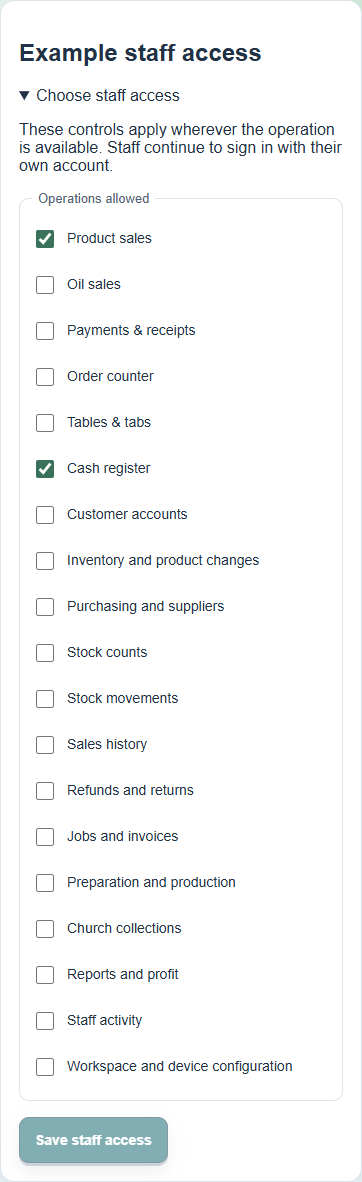
OWNER-CONTROLLED ACCESS
Staff use their own sign-in. An owner chooses which operations each account can access, including product sales, cash register, purchasing, stock changes and reports. This lets a business assign day-to-day selling without giving every cashier access to business configuration.
See the full Stockroom feature list · Compare business workspaces
READY TO START?
Request a one-use registration key in Stockroom, check your owner email, then complete business setup. Existing owners can sign in to manage subscriptions, referrals and devices.